

muCar
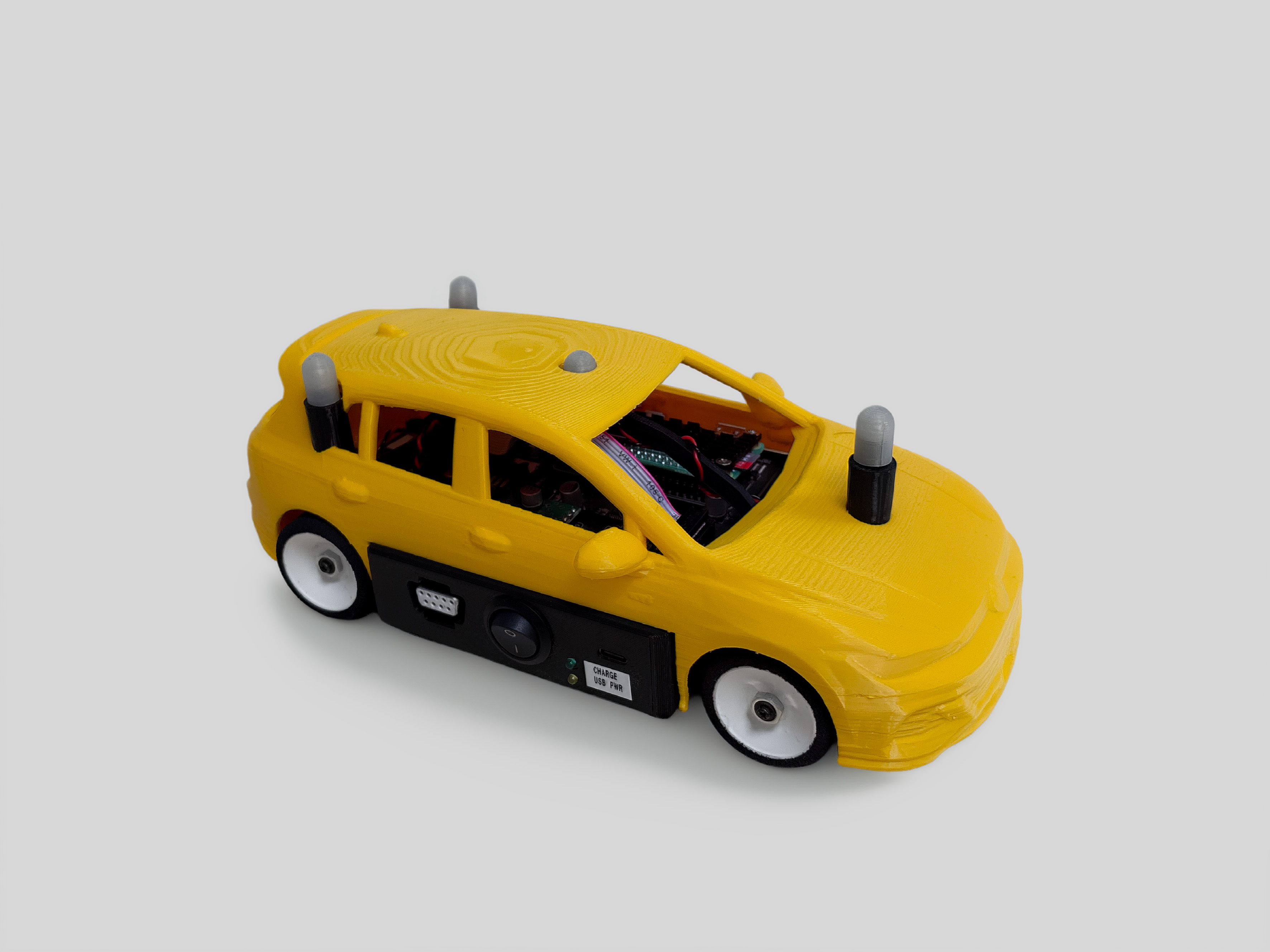
Version 2.1 of the muCar developed in 2026.
The muCar is loosely modeled on the Volkswagen Golf VII from 2016. It features Ackermann steering and four-wheel drive with single-wheel suspension. The onboard processing is performed using a Raspberry Pi Zero 2 W, which communicates with an ATmega 2560. The sensor data is gathered from an Adafruit BNO055 and a custom wheel speed sensor. All components are connected with a custom PCB.
muCar |
Full Scale |
VW Golf VII |
|
|---|---|---|---|
Turning radius |
0.34 m |
10.8 m |
10.9 m |
Wheel base |
0.15 m |
2.70 m |
2.65 m |
Track width |
0.09 m |
1.62 m |
1.53 m |
Length |
0.25 m |
4.50 m |
4.26 m |
Width |
0.125 m |
1.98 m |
2.03 m |
Height |
0.08 m |
1.44 m |
1.53 m |
Maximal speed (Limited) |
2.1 m/s (1.5 m/s) |
37.8 m/s (27.0 m/s) |
52.0 m/s |
The software of the muCars lives in the vehicle workspace
ros2-workspace-vehicle: the
vehicle controller, the scripts to build and deploy it, and the operating system of the cars. This page follows its
README.md.
The cars run Ubuntu Server 24.04 with a PREEMPT_RT kernel (6.8.4-rt11-raspi) and ROS2 Jazzy with
rmw_zenoh_cpp. They have no internet access: the central workstation (192.168.1.249) serves the controller,
the Zenoh router, NTP and the OS packages, see Central Workstation. Everything is built in Docker on the
central workstation: no sudo, no privileged containers, no loop-mounted images and no host toolchain.
Overview
Path |
Purpose |
|---|---|
|
ROS packages, as git submodules: |
|
Cross compiling and packaging the controller ( |
|
CMake toolchain for |
|
Shipped with the controller: |
|
The muCar OS: SD-card images, cross-compile sysroot, provisioning, package updates on running cars |
|
Build outputs (ignored by git) |
        ---
config:
  layout: elk
  startOnLoad: false

---
flowchart LR
   BASE[mucar-base<br/>Ubuntu image] --> OS[mucar-os:flavor]
   OS --> SYS[mucar-sysroot:flavor]
   OS --> IMG[SD-card image<br/>dist/image/*.img.xz]
   IMG -->|provision.bash| SD[SD card]
   SYS -->|docker/build.bash| PKG[dist/package.tar.gz]
   PKG -->|docker/deploy.bash| WEB["/var/www/html/raspberry3"]
   WEB -->|download on boot| CAR[muCar]
   SD --> CAR
From the car OS to the controller on the muCar
The controller is always compiled against the same OS that runs on the cars, so libraries and headers match exactly.
On every boot a car runs vehicle-controller.service → /usr/local/bin/install_and_start.bash, which downloads
http://192.168.1.249/raspberry3/package.tar.gz, unpacks it to /tmp/package and runs start.bash.
start.bash checks the NTP time sync, derives the vehicle ID from the IP address (192.168.1.<20 + ID>) and
starts the controller with real-time priority, connected to the Zenoh router at tcp/192.168.1.249:7447.
Requirements
On the central workstation, or any Linux x86_64 or arm64 computer used for building:
What |
Check |
Notes |
|---|---|---|
Docker with buildx |
|
Your user is in the |
arm64 emulation (qemu binfmt) |
|
Needed to build the car OS on |
Disk space |
|
About 40 GB free: base images, OS and sysroot images (~4 GB per flavor), BuildKit cache, SD-card images. |
Web server |
|
The cars download the controller from there, see Central Workstation. |
|
Host tools used by the scripts |
Typical durations on the central workstation:
Step |
Duration |
|---|---|
Import a base image ( |
~5 min |
Build the OS on the official Ubuntu image ( |
~1 h (ROS is installed under emulation) |
Build the OS on the old firmware ( |
~10 min |
Rebuild after changing |
Minutes (earlier layers are cached) |
Assemble an SD-card image ( |
~5 min |
Cross compile the controller |
~1 min, incremental builds seconds |
Provision one car |
~30 s plus writing the SD card |
First-Time Setup
git clone --recurse-submodules git@git.rwth-aachen.de:CPM/Project/Lab/ros2/workspaces/ros2-workspace-vehicle.git
cd ros2-workspace-vehicle

# Car OS on the official Ubuntu image: the default sysroot and the image for the SD cards
make -C image base                     # downloads and verifies Ubuntu 24.04.5 -> mucar-base:24.04.5
make -C image os sysroot image tools   # -> mucar-os:ubuntu, mucar-sysroot:ubuntu, dist/image/*.img.xz
Only for cars that still run the old firmware (needs /opt/ros/mucar_firmware_24_04_jazzy.img, see “Migrating from
the Old Firmware”):
make -C image base-legacy              # imports the old firmware -> mucar-base:legacy
make -C image FLAVOR=legacy os sysroot # -> mucar-os:legacy, mucar-sysroot:legacy
To deploy without sudo, make the web directory writable for your group once:
sudo chgrp "$(id -gn)" /var/www/html/raspberry3 && sudo chmod g+w /var/www/html/raspberry3
Building and Deploying the Controller
./docker/build.bash     # or: make          -> dist/package.tar.gz, dist/package.tar.gz.sha256, dist/VERSION
./docker/deploy.bash    # or: make deploy   -> /var/www/html/raspberry3/package.tar.gz
Restart a car, or run sudo systemctl restart vehicle-controller on it, to load the new package.
build.bash cross compiles src/ in a container against the sysroot image and packages package/ together
with the colcon install/ tree. Nothing is written to the source tree. dist/VERSION (also inside the package
as package/VERSION) records the commits of the workspace and each submodule (git describe --tags), the
sysroot image, the build type and the build time.
Variable |
Default |
Meaning |
|---|---|---|
|
|
OS to compile against. Must match what the cars run: |
|
empty (no optimization) |
e.g. |
CMAKE_BUILD_TYPE=Release ./docker/build.bash
SYSROOT_IMAGE=mucar-sysroot:legacy ./docker/build.bash   # cars on the old firmware
Each sysroot and build type keeps its own incremental build cache.
deploy.bash verifies the checksum and copies package.tar.gz (and its .sha256) to WEB_DIR (default
/var/www/html/raspberry3). It also keeps a timestamped copy package-<time>.tar.gz there for a rollback. It only
uses sudo if the directory is not writable for you.
Warning
All cars download the same package. A new deployment replaces the controller of every car at its next start.
Interactive Cross-Compile Shell
./docker/shell.bash (or make shell) opens the cross toolchain with the repository mounted at /ws (files
stay owned by you) and the sysroot at /sysroot:
source /sysroot/opt/ros/jazzy/setup.bash
colcon build --cmake-args -DCMAKE_TOOLCHAIN_FILE=/ws/toolchain.cmake
acados and CasADi
The cross-compile shell contains host-native acados 0.5.5, CasADi 3.7.2 and the Python generation tools. The cars and their sysroots only contain the ARM64 solver libraries and headers. The same versions are installed in the Docker images of the lab workspace, see Building from Source.
Generate the solver C code in docker/shell.bash with AcadosOcpSolver.generate(ocp, json_file="ocp.json")
instead of building or loading an ARM64 solver in host Python, then cross compile the generated sources against
/sysroot/opt/acados/lib. For an acados-generated Makefile:
make -C c_generated_code \
  CC="aarch64-linux-gnu-gcc --sysroot=/sysroot" \
  INCLUDE_PATH=/sysroot/opt/acados/include LIB_PATH=/sysroot/opt/acados/lib \
  LDFLAGS="-L/sysroot/opt/acados/lib -Wl,-rpath-link,/sysroot/opt/acados/lib" \
  shared_lib
For CMake projects, use find_package(acados CONFIG REQUIRED) and link the imported acados target; CasADi
provides casadi::casadi. Set -DCMAKE_PREFIX_PATH="/opt/acados;/opt/casadi" together with the cross toolchain.
Deploy the ARM64 solver together with the controller. CasADi-generated C functions are normally standalone and need
neither Python nor libcasadi on the car. Rebuild the OS and the sysroot before using these libraries; older
images do not contain them.
Native Build
make local builds natively on the host, for development and tests, not for the cars. make clean removes
build/, install/, log/ and dist/.
The muCar OS Image
The OS of the cars is defined in image/ and built as Docker images:
File |
Defines |
|---|---|
|
Packages installed on top of Ubuntu (ROS, real-time tools) |
|
Packages removed from Ubuntu (stock kernel, snapd, …) |
|
Files copied onto the image: services, |
|
Pinned real-time kernel, ROS apt source, acados 0.5.5 and CasADi 3.7.2, build steps |
|
Optional local kernel packages, e.g. the exact kernel of the current cars ( |
There are two flavors (FLAVOR=... for make -C image):
ubuntu(default): built on the official Ubuntu 24.04.5 Raspberry Pi image. Used for new SD cards.legacy(optional): built on the old car firmware. Gives a sysroot matching the cars that are not reflashed yet.
make -C image os builds the arm64 OS under emulation, so the image is exactly what runs on the car, and
make -C image image assembles a bootable SD-card image from it without privileges.
Setting Up a Car
Nothing is configured by hand on the cars.
Fill in the credentials once.
image/secrets.envis ignored by git:cp image/secrets.env.example image/secrets.envVariable
Meaning
WIFI_SSID,WIFI_PSKLab Wi-Fi
SSH_AUTHORIZED_KEYS_FILEFile with the SSH public keys allowed to log in as
ubuntu(relative tosecrets.envor absolute)UBUNTU_PASSWORD_HASHOptional password for
ubuntu, also enables SSH password login. Create it withopenssl passwd -6ormkpasswd -m sha-512.At least one of SSH key or password is required. Single-quote values containing
$or spaces.Reserve the IP address of the car on the DHCP server: car
Ngets192.168.1.<20 + N>for its wlan0 MAC address, see Network. The vehicle ID is derived from this address.Write the SD card:
image/provision.bash --car 11 --device /dev/sdXOption
Meaning
--car NVehicle ID, sets the hostname
mucar-N--device DEVSD card to write. Asks for confirmation, then unmounts its partitions before flashing (skip the confirmation with
--yes). Refuses unmount failures and disks that are not removable, USB or MMC (override only the disk type check with--force).without
--deviceOnly writes
dist/image/cars/mucar-N.img(and.bmap), e.g. for the Raspberry Pi Imager--image FILEImage to use (default: newest
dist/image/mucar-os-ubuntu-*.img.xz)--secrets FILEDefault
image/secrets.env--keepKeep
dist/image/cars/mucar-N.imgafter flashing (it contains the Wi-Fi credentials)Boot the car. On the first boot, cloud-init sets the hostname, creates the
ubuntuuser, a fresh machine-id and SSH host keys, and grows the root partition to the size of the SD card. The controller starts automatically on every boot.
After a successful flash, provisioning removes the old entry of the car from your ~/.ssh/known_hosts. For cards
flashed outside the script, run ssh-keygen -R 192.168.1.<20 + N>. Verify the new host key when you reconnect.
Warning
image/secrets.env and the images in dist/image/cars/ contain the Wi-Fi credentials. Never commit or share
them.
Changing Packages on the Cars
Try it out in the car OS:
make -C image shell(or withFLAVOR=legacy) opens an arm64 shell, thenapt-get update && apt-get install <package>.Add the package to
image/packages.txtand commit.Rebuild the OS, the sysroot (so the controller can be compiled against it) and the package repository:
make -C image os sysroot apt-repo # also with FLAVOR=legacy while cars run the old firmwareRoll it out to the running cars. They have no internet access; the central workstation acts as apt proxy:
make -C image proxy               # once: apt-cacher-ng on :3142, mucar-os repository on :8090
image/fleet.bash bootstrap 3 11   # once per car still running the old firmware (asks for its sudo password)
image/fleet.bash update           # all cars in image/fleet.conf, or e.g. `update 3 11`
image/fleet.bash status           # OS version, kernel and mucar-os version per car
update upgrades the mucar-os metapackage on each car and installs packages that are new in packages.txt.
Packages that are already installed are not upgraded, so the cars stay compatible with the sysroot. New SD cards get
the packages with the next make -C image image. The vehicle IDs and addresses of the fleet are set in
image/fleet.conf. Changes to the kernel, the boot configuration (config.txt, cmdline.txt) and other
image/rootfs/ files require reflashing.
Builds with uncommitted changes in image/ get a .dirty.<hash> version suffix. Roll out only builds of
committed changes, since apt cannot order dirty versions.
Migrating from the Old Firmware
The cars currently run an SD-card copy of mucar-7 (/opt/ros/mucar_firmware_24_04_jazzy.img). Every car
flashed from it shares the hostname, machine-id and SSH host keys of that car.
The migration requires reflashing each SD card: image/fleet.bash update cannot switch the base OS or install
the solver runtime. Test one car first, preferably with a spare SD card, and keep the original card and the deployed
controller package for a rollback. Run the following commands in the repository root and roll out committed changes
only.
Build the new OS, sysroot and SD-card image. The OS and the sysroot must be rebuilt together, so the controller links against the libraries on the cars. An uncached OS build takes about an hour.
make -C image base                              # once, if the Ubuntu base is not imported yet
make -C image FLAVOR=ubuntu os sysroot image tools
make -C image FLAVOR=ubuntu check-solvers        # acados / CasADi native runtime check
Configure and flash one test car. Set up
image/secrets.envas described in Setting Up a Car (cp -nkeeps existing credentials) and reserve the IP address of the car. Use an ID other than 7 for the first test: the old firmware already boots asmucar-7, so another hostname shows that provisioning succeeded.cp -n image/secrets.env.example image/secrets.env lsblk -o NAME,SIZE,MODEL,TRAN,MOUNTPOINTS # Replace /dev/sdX with the SD card. WARNING: this erases the entire selected device. image/provision.bash --car 11 --device /dev/sdXBoot and verify the test car. The central workstation must provide the controller download, the Zenoh router and NTP as before. Insert the card, let cloud-init finish the first boot, and connect (the SSH host key changed):
ssh-keygen -R 192.168.1.31                       # only if provisioning did not remove it already
ssh ubuntu@192.168.1.31
On the car:
cloud-init status --wait
hostname                                       # mucar-11
cat /etc/mucar-release                          # BASE_IMAGE=mucar-base:24.04.5
uname -r                                       # 6.8.4-rt11-raspi
timedatectl                                     # clock synchronized to the lab NTP server
ls /dev/spidev*
sudo systemctl status vehicle-controller.service
sudo journalctl -u vehicle-controller.service -b --no-pager -n 100
A running service alone does not prove that the vehicle works: test the controller communication and behavior safely.
Build and deploy the controller against the new sysroot.
./docker/build.bash       # builds against mucar-sysroot:ubuntu by default
./docker/deploy.bash
ssh ubuntu@192.168.1.31 'sudo systemctl restart vehicle-controller.service'
Warning
All cars download the same controller package. Deploying a build against the new sysroot replaces it for the legacy cars too, and it is not necessarily compatible with them. Use a maintenance window, keep the legacy cars stopped while testing and keep the previous package for a rollback.
Migrate the remaining cars. Reflash every remaining car with its own vehicle ID and verify it. The scripts build against
mucar-sysroot:ubuntuby default; while cars still run the old firmware, build their controller withSYSROOT_IMAGE=mucar-sysroot:legacy.
Keep /opt/ros/mucar_firmware_24_04_jazzy.img, the legacy Docker images and the original SD cards until the fleet
is validated. Cars that are not reflashed can still receive package updates after image/fleet.bash bootstrap, but
that is no OS migration.
Compared to the old firmware, the new image
gives each car its own hostname, machine-id and SSH host keys,
keeps the IP address and vehicle ID of a car after reflashing, because DHCP identifies it by its MAC address,
applies the NTP configuration as intended (the server stays
192.168.1.249),disables the daily apt runs; the cars only change through
fleet.bash,contains the native acados and CasADi libraries,
and leaves out unneeded server packages.
Continuous Integration and Releases
Every push runs shellcheck, hadolint and the provisioning test, and builds src/ on a regular ROS2 Jazzy
installation and runs its tests (run_gtest, same job as in the lab workspace). The vehicle workspace is released
together with the rest of the CPM Lab, see Releasing the CPM Lab. Add your changes to the Forthcoming section of its
CHANGELOG.rst while developing.
Troubleshooting
On the central workstation:
Problem |
Solution |
|---|---|
|
arm64 emulation is missing, see Requirements |
|
|
|
Only for cars on the old firmware: |
|
Root-owned leftovers of the old build scripts: |
|
|
The first OS build is slow |
Expected under emulation (~1 h); later builds are cached |
|
|
|
Start the apt services and build the repository |
On a car (ssh ubuntu@192.168.1.<20 + N>):
Command |
Shows |
|---|---|
|
Download and start of the controller |
|
OS version, base image, kernel |
|
First-boot setup (hostname, user, Wi-Fi, partition resize) |
|
Network and Wi-Fi |
|
NTP time sync (the controller waits for it) |